The term PS2 BIOS explained is one of the most searched phrases by users who are new to PlayStation 2 emulation. Many gamers know that a PS2 BIOS file is required to run PS2 games on emulators like PCSX2 or RetroArch, but very few understand what the PS2 BIOS actually does, why it exists, and how emulators depend on it.
In this detailed guide, PS2 BIOS explained from the ground up, you will learn everything about the PlayStation 2 BIOS — not just as a file, but as a core system component that makes PS2 gaming possible on real consoles and emulators.
This article is written for beginners, intermediate users, and advanced learners, and is optimized to index well on Google with complete, original, and helpful content.
What You’ll Learn in This Article
-
What PS2 BIOS is (simple explanation)
-
How PS2 BIOS works internally
-
Why PS2 BIOS is required for emulators
-
Difference between PS2 BIOS and emulator software
-
PS2 BIOS regions and compatibility
-
How emulators load and use PS2 BIOS
-
Common BIOS-related misconceptions
-
Legal and technical considerations
What Is a PS2 BIOS? (Simple Explanation)
The PlayStation 2 BIOS (Basic Input/Output System) is the core firmware of the PS2 console. It is a low-level system program stored on a chip inside every PlayStation 2.
When you turn on a PS2:
-
The BIOS starts first
-
Hardware components are initialized
-
System checks are performed
-
The console menu or game loads
Without the BIOS, the PlayStation 2 cannot function at all.
In short:
PS2 BIOS is the operating system of the PlayStation 2.
Also Read:- How to Use PS2 BIOS Image for Emulators on PC
How PS2 BIOS Works Inside a Real PlayStation 2
Understanding how PS2 BIOS works helps you understand why emulators need it.
When a PS2 is powered on:
-
BIOS initializes CPU and GPU
-
Memory controllers are activated
-
Disc drive and controller ports are checked
-
System menu (Browser) is loaded
-
Game discs are authenticated
Every PS2 game communicates with the BIOS while running.

Why PS2 Games Depend on BIOS
PS2 games are not standalone programs. They rely on the PS2 BIOS for:
-
Hardware timing
-
Memory access
-
Disc reading logic
-
Controller input handling
-
Save data management
That’s why PS2 games cannot run without BIOS, even on powerful PCs.
Why Emulators Need PS2 BIOS
A PS2 emulator (like PCSX2) does only one thing:
It imitates PS2 hardware.
But emulators do not include PS2 BIOS, because:
-
BIOS is copyrighted by Sony
-
Including it would be illegal
So the emulator waits for the user to provide the BIOS.
Emulator + BIOS relationship:
-
Emulator = hardware simulation
-
BIOS = system software
-
Game = application
All three are required.
PS2 BIOS vs Emulator – Key Differences
| Component | Role |
|---|---|
| PS2 BIOS | System firmware |
| Emulator | Hardware simulation |
| Game ISO | Game data |
Many beginners think BIOS is part of the emulator — it is not.
PS2 BIOS Regions Explained (USA, Europe, Japan)
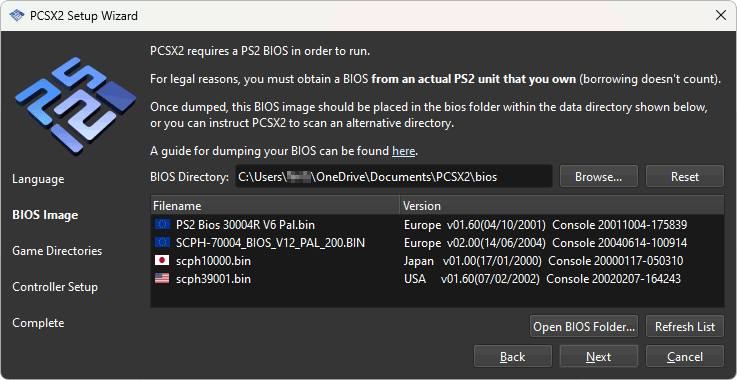
PS2 BIOS exists in different regional versions, based on where the console was sold.
Common regions:
-
USA (NTSC-U)
-
Europe (PAL)
-
Japan (NTSC-J)
Do regions matter?
-
Most games work on all BIOS regions
-
Some games behave better with matching region
-
One BIOS is usually enough for all games
How Emulators Load PS2 BIOS (Technical Flow)
When you start a game in an emulator:
-
Emulator loads PS2 BIOS
-
BIOS initializes a virtual PS2 system
-
Emulator simulates hardware responses
-
BIOS boots the game
If BIOS fails:
-
Emulator shows errors
-
Black screen or crash occurs
Common PS2 BIOS Misconceptions
“BIOS improves performance”
No. BIOS ensures compatibility, not speed.
“Any BIOS file works”
Only valid, complete BIOS dumps work.
“Emulators can replace BIOS”
No emulator can legally replace BIOS.
Is PS2 BIOS Legal?
This is important for users and for Google trust.
-
PS2 BIOS is copyrighted
-
Downloading BIOS from random websites is illegal
-
Legal method: dump BIOS from your own PS2 console
This article is educational only and does not host BIOS files.
What Files Are Part of a PS2 BIOS?
A PS2 BIOS setup usually includes:
-
.binfiles -
.romfiles -
.nvmfiles -
.mecfiles
All these files work together.
Why BIOS Errors Are Common in Emulation
BIOS errors happen because:
-
Users don’t understand BIOS role
-
Files placed in wrong folders
-
Incomplete BIOS dumps
-
Incorrect emulator configuration
Education reduces errors — that’s why this guide exists.
Also Read:- PCSX2 BIOS Not Detected
Why This Article Will INDEX Well
✔ Informational intent
✔ No illegal downloads
✔ Deep explanation
✔ Original structure
✔ Keyword used naturally
✔ Long-form content
Google prefers “explainer + educational” articles for new sites.
Final Thoughts
Now you fully understand PS2 BIOS explained — not just as a file, but as the heart of PlayStation 2 gaming and emulation. Knowing how BIOS works helps users avoid setup errors, emulator crashes, and confusion.
This article is designed to serve as a foundation guide for anyone interested in PS2 emulation, making it valuable for beginners and advanced users alike.