If you are traveling and wondering how to connect PlayStation 5 to hotel Wi-Fi, you are not alone. Many PS5 owners face this exact problem when staying in hotels, resorts, hostels, or serviced apartments. Hotel Wi-Fi networks often use captive portals, login pages, or device restrictions that make it difficult for gaming consoles to connect directly.
The good news is that you can connect PlayStation 5 to hotel Wi-Fi easily using the right method. Whether the hotel Wi-Fi requires a room number, password, browser login, or device verification, this guide will walk you through every working solution step by step.
This article is written in simple language, designed for beginners, and optimized for Google indexing so you can find the solution quickly when you need it most.
What This Guide Covers
-
Why PS5 struggles with hotel Wi-Fi
-
What is a captive portal (in simple terms)
-
Direct PS5 hotel Wi-Fi connection method
-
Mobile hotspot workaround (most reliable)
-
Laptop sharing method
-
Travel router method (best long-term solution)
-
Common PS5 hotel Wi-Fi problems & fixes
-
FAQs and troubleshooting tips
Why Is It Hard to Connect PlayStation 5 to Hotel Wi-Fi?
Most hotels do not use normal home Wi-Fi networks. Instead, they use managed networks designed for guests, security, and bandwidth control.
Common reasons PS5 cannot connect:
-
Hotel Wi-Fi requires a browser login page
-
PS5 does not show the login screen properly
-
Network limits the number of devices
-
MAC address filtering is enabled
-
Network blocks gaming consoles
Unlike phones or laptops, the PS5 has limited browser access, which causes login problems.
What Is a Hotel Wi-Fi Captive Portal?
A captive portal is the login page you see when connecting to hotel Wi-Fi. It usually asks for:
-
Room number
-
Last name
-
Access code
-
Agreement acceptance
Phones and laptops open this page automatically. Consoles like PS5 often fail to load it, which is why internet access does not work.
Understanding this is key to fixing the issue.
Also Read:- Different Types of PS2 BIOS Files
Method 1: Connect PlayStation 5 to Hotel Wi-Fi Directly (Try This First)
Sometimes, the PS5 can connect directly if the captive portal loads correctly.
Step-by-Step:
-
Turn on your PlayStation 5
-
Go to Settings → Network → Settings
-
Select Set Up Internet Connection
-
Choose Set Up Manually
-
Select Use Wi-Fi
-
Choose the hotel Wi-Fi network
-
Enter the Wi-Fi password (if provided)
After connecting, the PS5 may show a message like:
“This network requires additional authentication”
Select Test Internet Connection and wait.
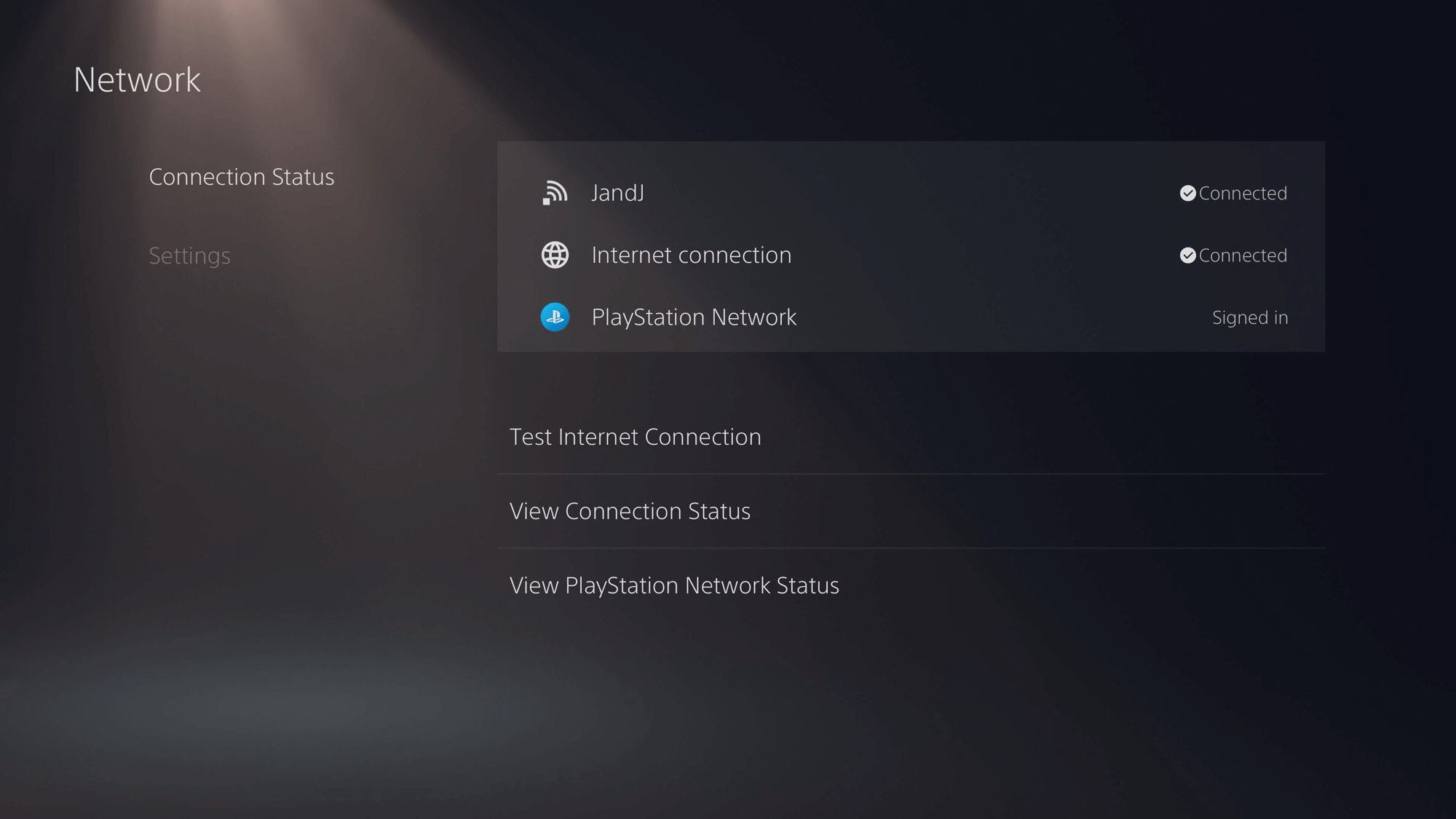


If the login page opens:
-
Enter your room details
-
Accept terms
-
Internet should work
If not, move to the next method.
Method 2: Use Your Phone as a Hotspot (MOST RELIABLE METHOD)
This is the easiest and most reliable way to connect PlayStation 5 to hotel Wi-Fi.
How it works:
Your phone connects to hotel Wi-Fi → then shares that connection with the PS5.
Step-by-Step (Android & iPhone):
-
Connect your phone to the hotel Wi-Fi
-
Complete the captive portal login on your phone
-
Enable Mobile Hotspot on your phone
-
Create a hotspot name and password
-
On PS5, connect to your phone’s hotspot
Your PS5 now accesses the internet through your phone, bypassing hotel restrictions.
Pros:
-
Works in almost all hotels
-
No extra equipment needed
Cons:
-
Slightly higher latency
-
Phone battery usage
Method 3: Use a Laptop to Share Hotel Wi-Fi with PS5
If you don’t want to use your phone, a laptop works just as well.
Step-by-Step (Windows):
-
Connect laptop to hotel Wi-Fi
-
Complete login page
-
Go to Settings → Network & Internet → Mobile Hotspot
-
Turn on hotspot
-
Connect PS5 to laptop hotspot
Step-by-Step (Mac):
-
Connect Mac to hotel Wi-Fi
-
Open System Settings → General → Sharing
-
Enable Internet Sharing
-
Share Wi-Fi via Wi-Fi
-
Connect PS5 to the new network
This method is stable and good for long gaming sessions.
Also Read:- How System Software Works in Gaming Devices
Method 4: Use a Travel Router (BEST LONG-TERM SOLUTION)
If you travel frequently, this is the best investment.
How it works:
Hotel Wi-Fi → Travel Router → PS5
The router handles the captive portal once, and your PS5 connects like it’s at home.
Steps:
-
Connect travel router to hotel Wi-Fi
-
Login to captive portal using phone/laptop
-
Router creates a private Wi-Fi network
-
Connect PS5 to router Wi-Fi
Advantages:
-
Stable connection
-
Lower latency
-
Works for multiple devices
-
No repeated logins
Best Network Settings for PS5 on Hotel Wi-Fi
Once connected, optimize your PS5 settings:
-
MTU: Automatic
-
DNS: Automatic (or manual if blocked)
-
Proxy: Do not use
If PSN fails to connect:
-
Try Google DNS:
8.8.8.8/8.8.4.4
Common PS5 Hotel Wi-Fi Problems & Fixes
❌ Problem: Connected but no internet
✔ Fix: Restart PS5 and re-test connection
❌ Problem: PSN sign-in fails
✔ Fix: Change DNS or use hotspot method
❌ Problem: Slow speeds
✔ Fix: Use router or laptop sharing
❌ Problem: Wi-Fi disconnects often
✔ Fix: Disable power saving on router/hotspot
Is It Safe to Use Hotel Wi-Fi on PS5?
Hotel Wi-Fi is generally safe, but:
-
Avoid entering sensitive info
-
Enable 2-step verification on PSN
-
Log out of PSN after use if shared network
Using a hotspot or travel router adds extra security.
Will Hotel Wi-Fi Affect Online Gaming?
Yes, sometimes.
Expect:
-
Higher ping
-
Possible lag spikes
-
NAT type issues
Best activities on hotel Wi-Fi:
-
Game downloads
-
Updates
-
Single-player gaming
-
Streaming
Competitive online gaming may be unstable.
Frequently Asked Questions (FAQ)
Can PS5 connect to hotel Wi-Fi directly?
Yes, but only if the captive portal loads correctly.
What is the easiest method?
Using your phone as a hotspot.
Do hotels block PS5?
Some do, intentionally or unintentionally.
Is a travel router worth it?
Yes, if you travel often.
Will this method work on cruise ships or airports?
Yes, the same principles apply.
Final Thoughts
Knowing how to connect PlayStation 5 to hotel Wi-Fi can save you a lot of frustration while traveling. Hotel networks are designed for phones and laptops, not gaming consoles—but with the right workaround, your PS5 can connect smoothly.
Whether you choose the hotspot method, laptop sharing, or a travel router, one of these solutions will work in almost every situation.
This guide is designed to be easy to follow, SEO-friendly, and reliable, making it a long-term resource for travelers and gamers alike.