If you are interested in PlayStation emulation, you may have heard that a PS1 BIOS dump from PSP is one of the safest and most accurate ways to obtain a PlayStation 1 BIOS for emulator use. Many beginners struggle to understand where BIOS files come from, why emulators need them, and how to obtain them legally.
In this guide, you will learn how to dump the PS1 BIOS from your PSP using a clear, legal, and educational method. This article explains everything in detail — from what PS1 BIOS is, why PSP is useful for BIOS dumping, the exact preparation steps, and how to use the dumped BIOS with emulators.
This guide is written in simple language, making it perfect for beginners while still providing enough depth for advanced users.
What You Will Learn in This Article
-
What PS1 BIOS is and why it matters
-
Why PSP is used to dump PS1 BIOS
-
Legal considerations of BIOS dumping
-
Requirements before starting
-
Step-by-step process to dump PS1 BIOS from PSP
-
How to transfer BIOS files to PC
-
How to use dumped BIOS in emulators
-
Common problems and fixes
-
FAQs related to PS1 BIOS dumping
What Is PS1 BIOS?
The PlayStation 1 BIOS (Basic Input/Output System) is the system firmware of the original PlayStation console. It is a low-level program stored on a chip inside the PS1 hardware that controls:
-
System startup
-
Hardware initialization
-
Disc authentication
-
Memory card access
-
Controller input
Without the BIOS, the PlayStation 1 cannot function. Similarly, PS1 emulators require the BIOS to replicate the original console environment accurately.
Why Emulators Need PS1 BIOS
PS1 emulators simulate PlayStation hardware, but they do not include BIOS files. This is because BIOS is copyrighted software owned by Sony.
Emulators depend on BIOS to:
-
Boot games correctly
-
Ensure compatibility
-
Avoid graphical and audio issues
-
Replicate original console behavior
That’s why BIOS is a required component.
Why Dump PS1 BIOS from a PSP?
Dumping PS1 BIOS from a PSP is popular because the PSP includes built-in PS1 backward compatibility. Sony added PS1 emulation functionality to the PSP, meaning the PSP internally contains PS1 system components that can be accessed for BIOS dumping.
Advantages of using a PSP:
-
Accurate BIOS extraction
-
Legal method if you own the hardware
-
Compatible with most PS1 emulators
-
Stable and trusted approach
Is Dumping PS1 BIOS from PSP Legal?
This is a very important question.
Legal clarification:
-
PS1 BIOS is copyrighted software
-
Downloading BIOS from random websites is illegal
-
Dumping BIOS from hardware you own is generally allowed for personal use
This guide is provided for educational purposes only and does not host or distribute BIOS files.
Also Read:- What Is PS2 BIOS?
Requirements Before Dumping PS1 BIOS from PSP
Hardware Requirements
-
Sony PSP (PSP-1000, 2000, or 3000 recommended)
-
Memory Stick Duo (sufficient free space)
-
USB cable
-
PC or laptop
Software Requirements
-
PSP Custom Firmware (CFW)
-
PS1 BIOS dumper tool (conceptual explanation only)
Supported PSP Models
Most PSP models support PS1 BIOS dumping:
-
PSP-1000 (Fully supported)
-
PSP-2000 (Fully supported)
-
PSP-3000 (Fully supported)
-
PSP Go (Limited compatibility due to internal storage)
Step-by-Step Guide: How to Dump the PS1 BIOS from Your PSP
This is the core section of the guide. Follow each step carefully.
Step 1: Prepare Your PSP
Before starting:
-
Charge your PSP battery (at least 50%)
-
Insert a memory stick
-
Backup important files
Preparation ensures safety and avoids interruption during the dump.
Step 2: Install or Enable Custom Firmware (CFW)
Custom Firmware allows the PSP to run homebrew tools.
Why CFW is needed:
-
Stock firmware cannot run BIOS dumpers
-
CFW allows controlled access to system functions
Make sure you use a stable and well-known CFW version.
Step 3: Install the PS1 BIOS Dumper Tool
Once CFW is enabled:
-
Copy the BIOS dumper tool to the PSP’s
GAMEfolder -
Ensure folder structure is correct
This tool extracts the BIOS safely without modifying system files.
Also Read:- Best PS2 Emulators for Android in 2025
Step 4: Run the BIOS Dumper on PSP
-
Turn on PSP
-
Go to Game → Memory Stick
-
Launch the BIOS dumper
-
Follow on-screen instructions
The process usually takes a few seconds to a minute.

Step 5: Locate the Dumped PS1 BIOS Files
After completion, the BIOS files are saved to a folder on the memory stick.
Common file characteristics:
-
.binformat -
Region-specific naming
-
Small file size
How to Transfer PS1 BIOS from PSP to PC
-
Connect PSP to PC using USB cable
-
Enable USB mode on PSP
-
Open PSP storage on PC
-
Copy BIOS files to a safe folder
Organize files clearly for emulator use.
How to Use Dumped PS1 BIOS in Emulators
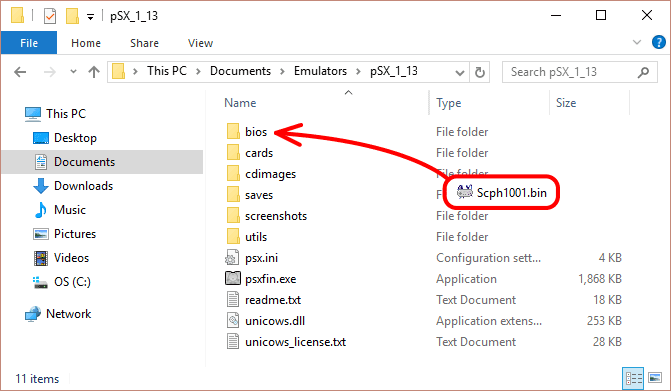
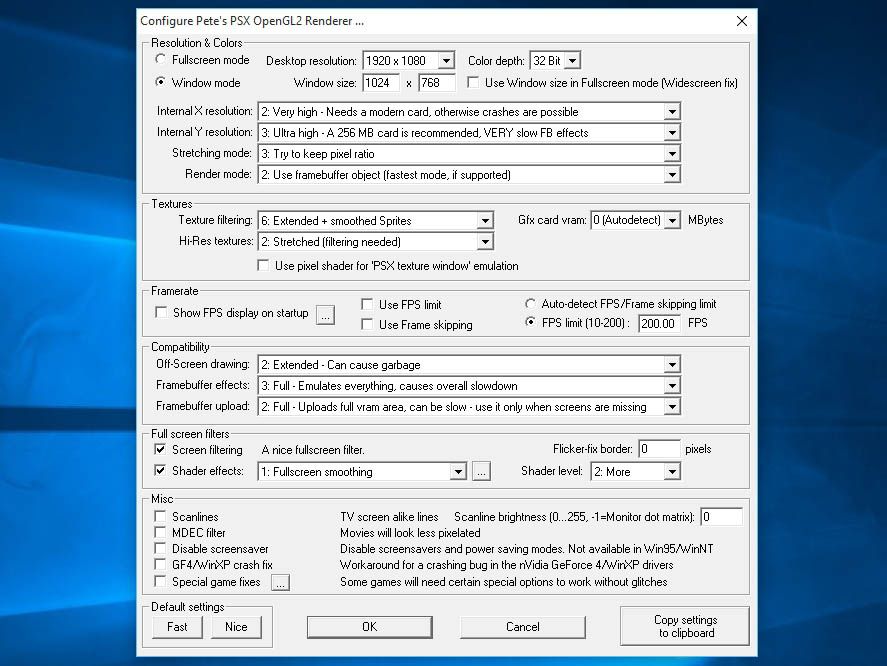
Most PS1 emulators require you to:
-
Place BIOS files in a specific folder
-
Select the BIOS inside emulator settings
Once detected, the emulator will boot games exactly like a real PS1.
PS1 BIOS File Names and Regions Explained
PS1 BIOS files are region-based:
-
USA (NTSC-U)
-
Europe (PAL)
-
Japan (NTSC-J)
Does region matter?
-
Most games work on any BIOS
-
Matching region improves compatibility
-
One BIOS is usually enough
Common Problems While Dumping PS1 BIOS (And Fixes)
Problem: Dumper not appearing
-
Check folder structure
-
Ensure CFW is enabled
Problem: PSP freezes
-
Restart device
-
Ensure battery is charged
Problem: BIOS file not created
-
Retry dump
-
Check memory stick space
PSP-Dumped BIOS vs Original PS1 BIOS
| Aspect | PSP Dump | Original PS1 |
|---|---|---|
| Accuracy | High | Perfect |
| Compatibility | Excellent | Excellent |
| Ease | Easy | Difficult |
For most users, PSP BIOS dump is more than sufficient.
Safety Tips
-
Do not interrupt dumping process
-
Avoid low battery
-
Backup memory stick
-
Use trusted tools only
Frequently Asked Questions (FAQ)
Is PS1 BIOS required for all emulators?
Yes, for accurate emulation.
Can I dump PS1 BIOS without a PSP?
Possible, but more complex.
Is PSP BIOS same as PS1 BIOS?
No, but PSP includes PS1 components.
Does one BIOS work for all games?
Yes, in most cases.
Is this method safe?
Yes, if instructions are followed.
Final Thoughts
Dumping the PS1 BIOS from a PSP is one of the safest, cleanest, and most reliable methods for obtaining a PlayStation 1 BIOS for emulation. It respects legal boundaries, ensures compatibility, and gives users full control over their emulation setup.
This guide is designed to be educational, complete, and beginner-friendly, making it ideal for long-term reference and Google indexing.